


IntuneManagement
This PowerShell script will is using Intune PowerShell module, Microsoft Graph APIs and AzureRM PowerShell module to manage objects in Intune and Azure. The script has a simple UI built in WPF and it supports operations like Export, Import, Copy and Download.
This makes it easy to backup or clone a complete Intune environment. This script will export and import assignments and supports import between environments. This script will create a migration table during export and use that for importing in other environments. It will create groups if they are missing in the environment for import.
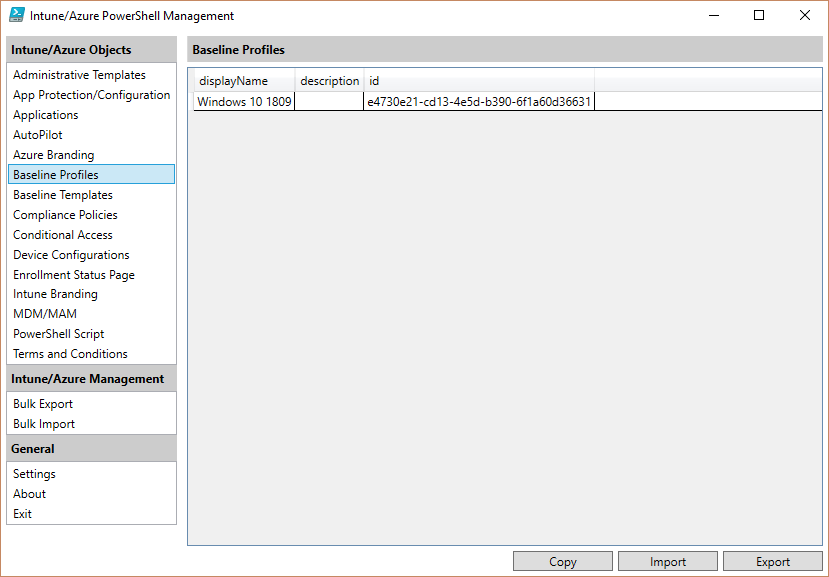
Note: The base PowerShell script is only a host for extensions. It is only used as a framework for basic UI, logging etc. The functionality is located in the extension modules which makes it easy to add/remove features.
Intune objects
- Administrative Templates
- App Protection/Configuration policies
- Applications
- Autopilot profiles
- Baseline Security profiles
- Compliance policies
- Configuration Items
- Enrollment Status Page profiles
- Intune Branding (Company Portal)
- PowerShell scripts (Supports download of PowerShell script)
- Terms and Conditions
Note: The Intune PowerShell module are using the BETA version of the Graph API which might change at any time.
Azure objects
- Conditional Access
- Company Branding
- MDM/MAM app settings
Note: Azure objects are not using the Microsoft Graph API. They are using undocumented APIs which might not be supported and change at any time.
Prerequisites
- .Net 4.7
- Intune PowerShell Module
- Install by running 'Install-Module -Name Microsoft.Graph.Intune'
- AzueRM PowerShell Module
- Install by running 'Install-Module -Name AzureRM -AllowClobber'
- Permissions in Azure to manage objects in Intune and Azure
References
Acknowledgments
Some parts of the code was based on PowerShell Intune Examples
Known Issues
The script is using two separate PowerShell modules for accessing Intune and Azure. This can cause multiple logins since they are authenticating to two different apps in azure and the authentication token for Intune PowerShell module have no permissions on the Azure objects.
The support for import/export between environments is limited. Only groups in assignments are supported in this version. Additional objects like users, locations, notifications etc. will not be migrated and might cause the import to fail.
The script will create a group if it is missing in the destination environment. It will create a security group with manual assigned members. This might not always be the desired case e.g. original group was synched from AD or it was a dynamic group.
License
This project is licensed under the MIT License - see the LICENSE file for details